Licensing |
  
|
Licensing |
|
Before you can run the program, you will need to obtain a licence from us. To do this, start the program. A window will appear:
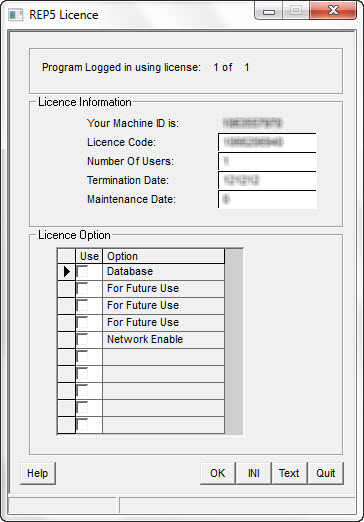
Either press "Alt+PrntScr" and paste the window into a Word document (or press the [Text] button - this will open Notepad so you can copy/paste a text version of the same information).
Then e-mail us with the licence information to: support@logicomep.com.
We will send back some numbers and a list of check-boxes to be enabled. Run the program again, enter the numbers and check the indicated boxes on the same screen. Click [OK] and the program should start.
From time to time you may be denied entry to the program due to the licensing system detecting a problem, this can be for a number of reasons:
1.You have not yet licensed the program on the PC you are using.
2.The licence period has terminated.
3.You have installed a version that is a newer release than is allowed by your maintenance date.
4.You have exceeded the allowed number of simultaneous users.
5.You do not have sufficient privileges in the program directory.
[Note: The last two problems usually occur if the program is installed on a network disk. Ask your system manager to contact us if he or she needs any assistance in fixing the problem.]
The [INI] button closes the program and opens a text editor to the program .ini file so that you can switch between a local PC licence and a wide-area-network licence (ask your IT manager to request details from us on how to do this.)
If you have already received licence codes, fill in the details and click on [OK].
If not, e-mail (or fax) the Machine ID information to us, click [Quit] to exit the program and try again when you receive the codes.
If you have received updated licence codes before your licence has lapsed (for example, to enable extra options or extend your licence period), select 'Env-Licensing' from the LogIC blue screen menu then enter the details and click [OK].
If the licensing window reappears with a 'too many users' error (and you are not using a network licence), click on [Quit] and rerun the program.
Licence Code |
**** |
Number Of Users |
**** |
Termination Date |
**** |
Maintenance Date |
**** |
(Licence Option) Database |
**** |
(Licence Option) For Future Use (1) |
**** |
(Licence Option) For Future Use (2) |
**** |
(Licence Option) For Future Use (3) |
**** |
(Licence Option) Network Enable |
**** |
OK |
Click to confirm |
INI |
Click to open program .ini file for wide-area-network licensing |
Text |
Click to open Notepad |
Quit |
Click to quit program |