Consolidation hierarchy |
  
|
Consolidation hierarchy |
|
When you are consolidating consolidations, it can get pretty complicated. One way to be sure of what is being consolidated is to view the consolidation "tree" or hierarchy.
Click on the  icon to access the Consolidation Hierarchy.
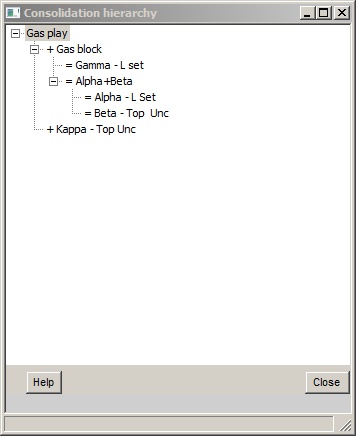
In this view, the top level consolidation is shown at the top, and the various subsidiary consolidations are shown as "tree branches" below it.
The standard Windows [-] and [+] symbols indicate a tree node, which is of course always a consolidation. If there is no tree node, the entry is a prospect.
Before the entry name, there is a symbol:
+ indicates that the entries are part of a general consolidation (without dependent risk)
= indicates that the entries are part of a consolidation with dependent risk
- indicates that the entries are part of a mutually exclusive consolidation.
If you click on an entry, its filename is shown in the status bar at the bottom of the hierarchy window: