Units |
  
|
Units |
|
Units are subdivided into dimensions such as length, volume, density etc.; and further subdivided into "unit series". These unit series are lists of units common to a particular measurement. So, for example, the dimension volume includes unit series named oil volume and gas volume. Within these series you will find the common units (barrels, cubic metres...) for these particular measurements. You will not find cubic inches or acre-feet, even though these are also volumes. You may find the unit series somewhat eclectic, however you will soon find your way through it.
Often the software will know and have assigned a unit series. When you click the units drop-down  you will see a dialog like this:
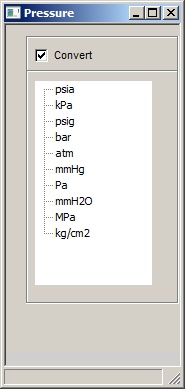
Click the unit you require, and check "Convert" if you wish any existing value to be converted to the new unit.
The are occasions when the software does not know, for example when identifying data or using the PDF calculator. In this case units are specified in the unit tree view:
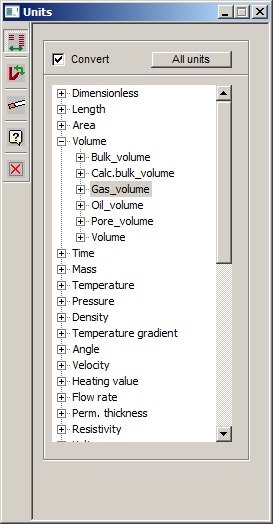
Convert |
|
Check this box if you wish to convert any existing values you have entered. (This applies only when you have come from a single entry. It may not apply, for example, to array data. |
All units |
|
Where the unit series is already defined for your entry, the tree will show only the units for that series. Click "all units" to show the full units tree. |
Expand tree |
|
Expand/collapse the tree. Only applies when all units are shown |
Filter |
|
Set a filter on the units. This is very useful when you know the unit, but don't recall which series it is in. See below for more details |
Help |
|
Help -shows this help page |
Exit/Close |
|
Closes the window |
A filter lops the tree so it only shows units containing the filter. In this example all the units with "acre" in them are shown:
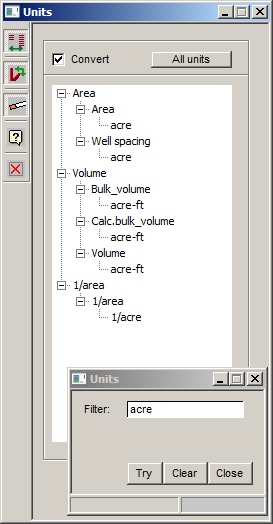
You can keep the filter but disable it by clicking the filter toolbar icon again (it's a toggle).
This simple facility makes unit conversions. See above for a discussion on how the unit system works
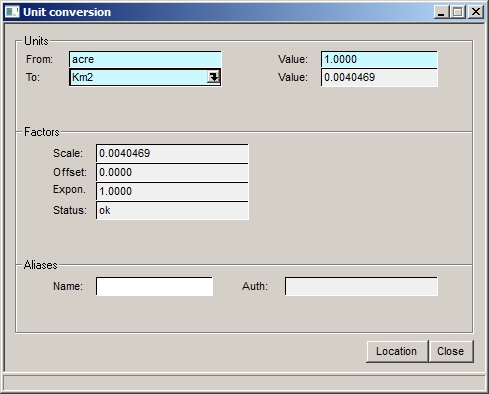
Make sure the units are in the same series!


