Fluid Correlations |
  
|
Fluid Correlations |
|
The Fluid Correlations dialog is split into four categories: Oil, Gas , Sorbed gas and Misc.
Simple fluid correlations for oil and gas are available when entering distributions for Bo and 1/Bg. The correlations are based on standard equations (Standing, McCord, etc.). They may or may not be valid for the hydrocarbons in your reservoir. Some of the correlations are based on a limited number of fluid samples, others may be incorrect above certain temperatures and pressures.
You are advised to use real data or analogous data rather than relying on these correlations.
In all these entries, the drop-down arrow at the right of the entry box allows you to change the unit, either converting the entered value (if it's there) or not.
For oil formation volume factor you need to enter oil and gas gravity, gas/oil ratio, reservoir temperature and reservoir pressure. If you know the bubble point pressure, check the box and enter it, otherwise the correlation will estimate it.
The accuracy of the correlation is much improved if you know the bubble point pressure; but if you do, you probably have a laboratory measurement of Bo as well.
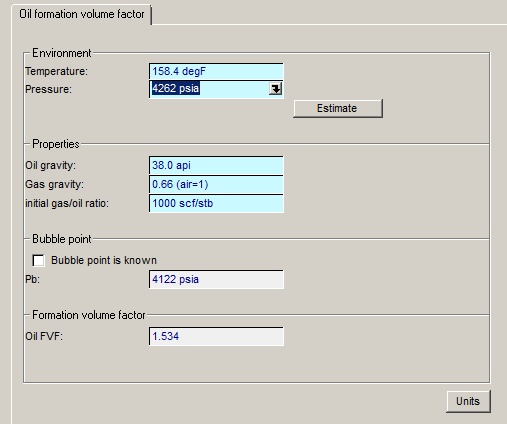
Environment |
|
Temperature |
Enter the temperature |
Pressure |
Enter the pressure |
Estimate |
Click this button to estimate temperature and pressure from depth and gradients. See below |
|
|
Properties |
|
Oil gravity |
Enter the oil gravity |
Gas gravity |
Enter the gas gravity |
initial gas/oil ratio |
Enter the initial gas-oil ratio |
|
|
Bubble point pressure |
|
Bubble point is known |
If you check this, you must enter a value to be used in the correlation. Otherwise if unchecked it will be estimated from with the correlation. |
Pb |
Enter the bubble point if you know it. |
|
|
Formation volume factor |
|
Oil FVF |
The estimated oil formation volume factor Bo. Bo is one of the input variables in a REP oil volume calculation |
|
|
Units |
Click to change units |
When estimating gas properties, you should first check the standard conditions (standard reservoir and pressure). Different countries (and in the USA, different states) can have different standard conditions and although the differences are usually small they can be both significant and irritating.
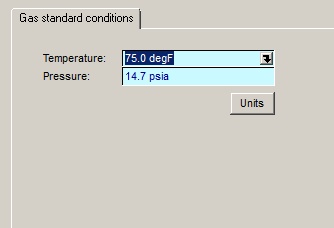
Temperature |
Enter the temperature defined for standard conditions |
Pressure |
Enter the pressure defined for standard conditions |
Units |
Click to change units |
Another source of confusion comes when the reservoir gas has significant impurities (inerts) - nitrogen or carbon dioxide, for example. Do the properties you wish to use refer to the reservoir or the processed gas? In REP you should use the properties of the reservoir gas (i.e. including inerts).
For properties by correlation you need to know the specific gravity, mole percentages of CO2, N2 and H2S (if any) and the reservoir temperature and pressure. The correlations for gas are fairly accurate and most of the error comes from uncertainty in reservoir temperature and pressure.
Standard gas properties (Z factor, gas expansion factor 1/Bg and density at reservoir conditions) can be derived either from correlation or from composition.
The units of all entries can be changed by clicking the [Units] button.
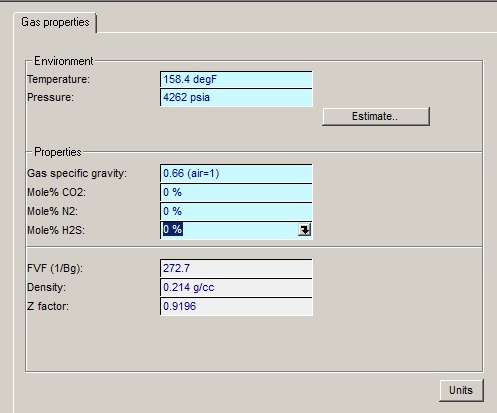
Environment |
|
Temperature |
Enter the reservoir temperature |
Pressure |
Enter the reservoir pressure |
Estimate |
Click this button to estimate temperature and pressure from depth and gradients. See below |
|
|
Properties |
|
Gas specific gravity |
Enter the gas specific gravity (air = 1) |
Mole% CO2 |
Enter the mole percentage of carbon dioxide |
Mole% N2 |
Enter the mole percentage of nitrogen |
Mole% H2S |
Enter the mole percentage of hydrogen sulphide |
|
|
Results |
|
FVF (1/Bg) |
This is the gas expansion factor (1/Bg) which you will need in an evaluation of a gas reservoir |
Density |
The downhole gas density (i.e. the density at reservoir conditions) |
Z factor |
This is calculated Z factor. |
|
|
Units |
Click to change units |