Custom attributes |
  
|
Custom attributes |
|
A project can have user-defined attributes that are defined for all assets in the project. To define the attributed either click the "project attributes" menu option from the project menu, or go to a prospect/field ID dialog and click "Add/configure" in the "Custom" box on the "General" (first) tab.
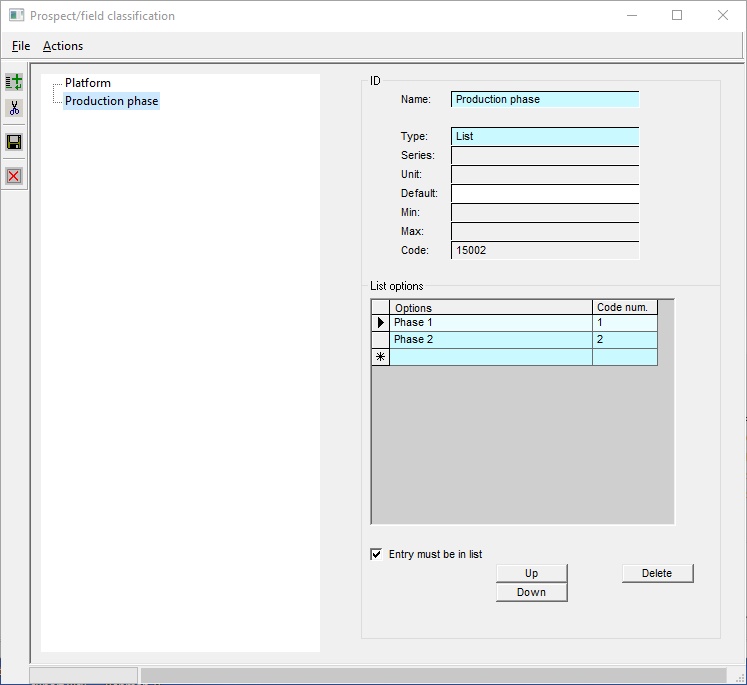
On the left hand side is a list of currently defined attributes. On the right hand side is the definition of the current highlighted attribute.
Buttons |
|
||||||||||||
|
Add a new attribute to the set |
||||||||||||
|
Delete the current attribute. It will deleted here in project definition, and also from all assets in the project |
||||||||||||
|
Saves the project definition, including the attributes |
||||||||||||
|
Close the window |
||||||||||||
|
|||||||||||||
Attribute ID |
|
||||||||||||
Name |
Its name. It must be unique |
||||||||||||
Type |
Options are List, Character, Integer or Real. List is the most common.
|
||||||||||||
Series, unit default |
Only for Real types, and refers to the units. |
||||||||||||
|
|||||||||||||
List options |
Type in the permissible options for List types. |
||||||||||||
Option |
The option the user can choose. You can have as many options as you can be bothered to define. |
||||||||||||
Code number |
Each option has an integer code so you can alter the option words a bit, without having to redefine the attribute in all the asset files. The program will choose one for you, but you can alter it if you really want to. |
||||||||||||
Entry must be in list |
Usually you want the the option list to be restrictive, but you can allow any entry by un-checking this box. |


