Water saturation height functions |
  
|
Water saturation height functions |
|
Where GRV is calculated from an area/depth table you can specify an Sw/Height function to calculate Sw as a function of depth above the water contact. To define the Sw-Height function you can either use a standard equation, or enter Sw and height values in a table.
For those equations which do not have a porosity term, or when using tabular data only, there is no associated uncertainly in the function beyond what may be implicit in the hydrocarbon-water contact or spill point/degree-of-fill combination. However, you apply an error function to Sw calculated from the Sw-height relationship. This is a simple multiplier:
Sw = Sw|tab x Sw_error
For those equations which do have a porosity term, the uncertainty in Sw is directly linked to that in porosity. Since Sw is often a large uncertainly in reserves calculation, this may result in overconfidence in the result. If this is an issue you can apply the error function described above.
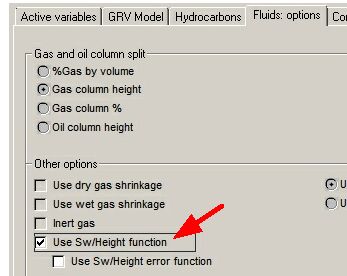
To use Sw/Height, check the box in the Hydrocarbons Model dialogue (the Fluids: options tab), or on the Input Data Summary property sheet. You can also choose to use the error function here. Then choose the menu option Parameters | NTG/Porosity/Sw or click the [Sw/Height] button on the first page of the Input Data Summary property sheet.
Saturation-height functions can be defined individually for each layer.
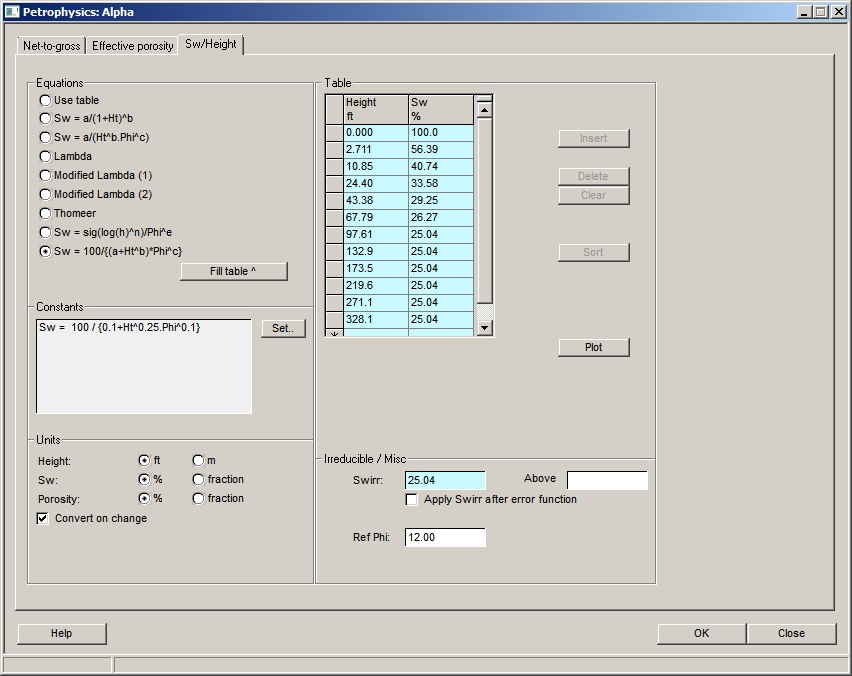
Equations |
|
Equations |
Choose equation you wish to use |
Fill> |
Click to fill table with points derived from the equation |
|
|
Constants |
|
Set.. |
Click to set/adjust the equations |
|
|
Units |
|
Height |
Choose a unit for height |
Sw |
Choose to show water saturation as a percentage or as a fraction |
Porosity |
Choose to show porosity as a percentage or as a fraction |
Convert on change |
Convert existing values on unit change |
|
|
|
|
Table |
|
Height ft/m |
Enter the height above contact/spill. Note that it is possible to be extremely pedantic about the difference between hydrocarbon water contact and free water level. In a REP context the difference can be safely ignored - or, if not, you may be using the wrong software. |
Sw %/fr |
Enter the corresponding water saturation |
Insert |
Click to insert a new entry |
Delete |
Click to delete the selected entry |
Clear |
Click to clear the table |
Sort |
Click to sort the entries |
Plot |
Click to plot the data |
|
|
Irreducible/Misc |
|
Swirr |
Enter the irreducible water saturation |
Above |
Enter the height above which Sw-irr is effective (i.e. the top of the transition zone). Leave blank to apply as a minimum Sw at all depths. |
Apply Swirr after error function |
By default Sw is calculated and clipped to be at least the irreducible (Swirr) before the error function - if any - is applied. The final Sw can therefore be less than entered irreducible. This check-box reverses the order, ensuring that the final Sw is never less than Swirr. |
Ref Phi |
Enter a reference porosity for use in plotting equations |
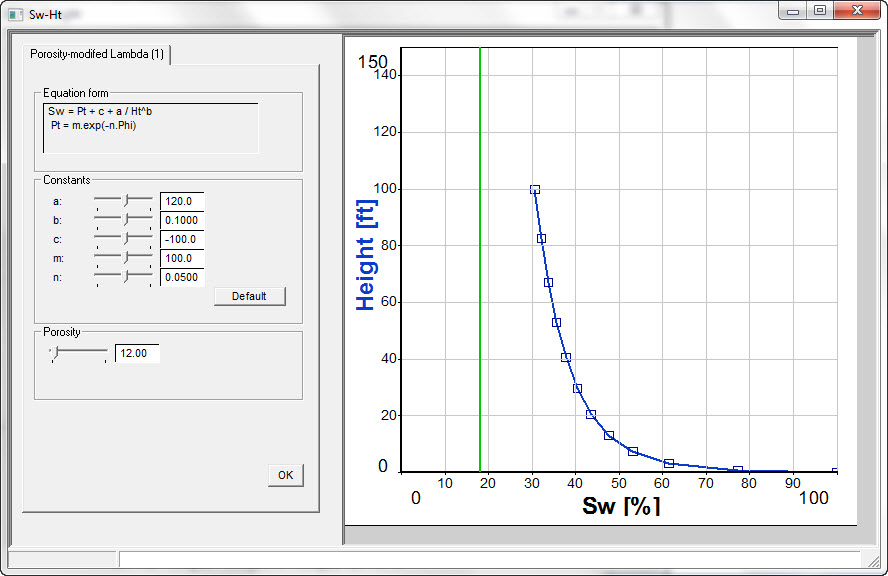
To use an equation, click the one you want to use from the list on the screen. The parameters to be used in the equation are shown in the "Constants" box. To change these, click the [Set..] button. This brings up the Constants Entry Screen where you can enter the constant values. On the right of this screen the function is plotted out. As you move the slider bars you can see how the function changes. This is particularly useful if porosity is an input to the equation. The porosity value used by the equation can also be varied by moving its slider, so you can see its effect.
Constants |
|
Default |
Click to set default constants |
Back in the main entry screen, you can fill the table on the right with Height and Sw values derived from the equation. Click the [Fill>] button. REP will calculate 12 values for Sw, starting at Height=0, and going up to Height=100, or up to the maximum height already entered in the table. Click the [Plot] button to show the Sw/Height curve on a graph. For equations which use porosity, you should enter a porosity to use in calculating the values in the table. This is the Ref. Phi entry at the bottom right of the screen.
Note: the units for height, Sw and porosity should be chosen in the box at the bottom left of the screen. They are independent of the units you have chosen elsewhere in the program. This is because the constants may have been derived by engineers or petrophysicists, a dismal and uncooperative cadre of pessimists whose twin goals - as everyone knows - are to confuse and reduce by wielding unlikely equations with arcane terms.
You must enter an irreducible Sw ("Sw-irr") and - optionally - a depth above which it applies in the "Irreducible" box at bottom right. If Sw-irr is entered, Sw is clipped so that it is always at least this value. If the "height above" is specified, Sw is always Sw-irr above this height.
If you wish to use an equation of a form not specified on the screen, it can easily be added. E-mail us at support@ogicomep.com.
To enter data in the table, click "Use table" in the Source box. Enter the values in the table. You can use the buttons at the right of the table to insert and delete rows, sort the data in ascending height order, and clear all the table entries.
You can also paste in numbers from the clipboard. First copy the numbers into the clipboard from LogIC or XL or any other compliant program. Then press Ctrl-v on the keyboard. If there are two columns in the clipboard they will fill the table. You can also paste column-by-column, by first clicking in the REP column you want to populate.
If you click the [Plot] button, a graph of the function is shown. You can enter and edit the table values directly on the graph:
·Double click to define a new point.
·Click and drag a point to move it to a new location.
·Right click on a point to remove it.
The irreducible saturation Sw-irr (see above) is shown as a green vertical line on the plot.
When you close the screen, REP checks the data. As height increases, so Sw should decrease, and if it does not REP will warn you of "kinks" in the function. You may choose to ignore this warning, and the program will use the function as it is.
The only rules that cannot be broken are that Sw must be greater than Sw-irr if entered, and less than or equal to 100%.