Deterministic Calculations |
  
|
Deterministic Calculations |
|
Deterministic calculations are, of course, never done by a true apostle of the probabilistic method, under any circumstances.
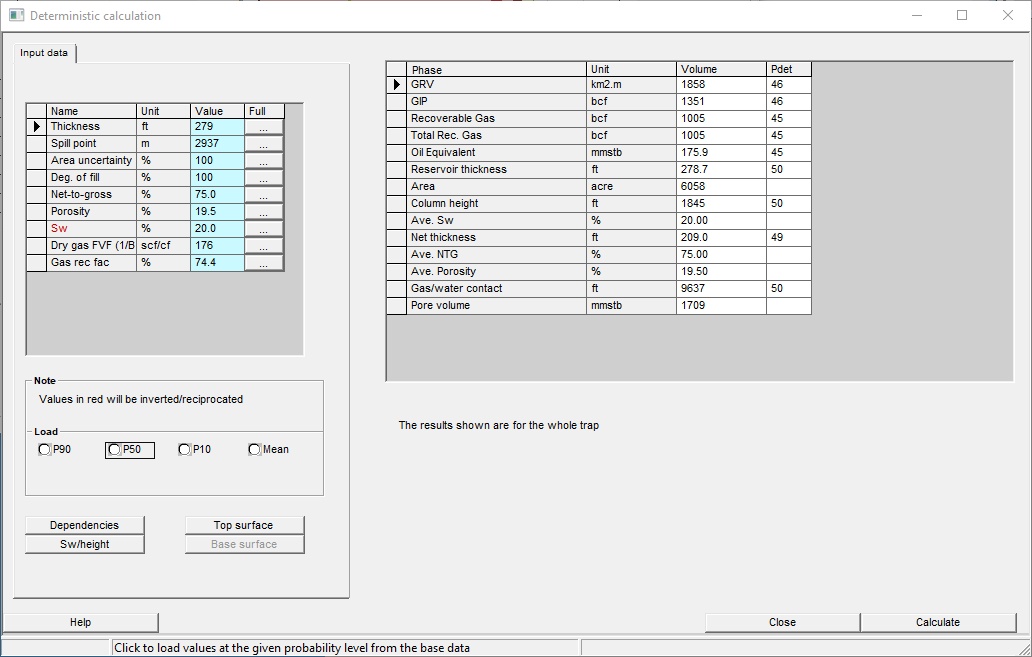
To run the deterministic calculator, choose the "Deterministic" option from the calculation menu. For the current model, the required variables are shown. Enter a value for each variable, and press the [Calculate] button. The results are shown on the right hand pane. The "Pdet" column shows the probability of achieving the deterministic result according to the current probability distributions. Note that because of the binning system Pdet may not correspond exactly with the probabilistic results.
You can load values from any underlying variables that have been defined, by clicking a probability level in the "Load" box. Note that by default the "geological" probability levels are loaded: for example, the P10 Sw will actually be the P90 value corresponding to the highest hydrocarbon volume. These "inverted" variables are shown in red. The common ones are Sw, Bo and %Inerts.
If you load all the P10's and calculate, the answer will not correspond to the P10 calculated probabilistically. In the unlikely event that you don't understand why this is, you most definitely need the REP training course; please contact Logicom E&P.
Deterministic calculation results are whole trap volumes.
It is best to run this facility when no-one else is looking.
Full |
Click to view/edit the distribution |
Dependencies |
Click to enter/edit variable dependencies |
Top Surface |
Click to see the top surface contours |
SW/Height |
Click to see the Sw/Height curve |
Base surface |
Click to see the base surface |