In this screen you can specify whether you wish to use a fixed or floating seed for the random number generator. Computers are unable to generate truly random numbers. Rather, they are given a starting number and from that derive a random(ish) sequence of numbers. But given the same starting point, they generate the same sequence of numbers.
If you use a fixed seed, successive calculations on the same data set and with the same number of iterations will give identical results.
If you specify a floating seed, the program will derive a seed based on the time of day (hours, minutes, seconds and hundredths of seconds) at which you start the calculations. It is most unlikely that successive calculations will have the same starting seed. Using different seeds, the results calculated for the same input data will be different. The amount of difference will depend on the input data and on the number of iterations.
Using a fixed seed is by no means consistent with the spirit of the Monte-Carlo method. But it is sometimes useful to be able to precisely duplicate previous results (if your photocopier has broken down, for instance), or if you are producing management reports. (Some company employees consider that Management gets very confused and bitter if numbers change for no obvious reason, and are liable to go around sacking people indiscriminately. They are, of course, quite wrong to think this. Good managers do not need an excuse.)
You may also specify the number of iterations in a calculation run. Increasing the number of iterations increases the stability of the results, but the calculations take longer. For most data sets, 2000 iterations gives reasonably consistent results. Modern machines are so fast that 20,000 iterations of a prospect only takes a few seconds.
With v5.4 and above, a better sub-sampling method was introduced. This has a small effect on the results compared to its predecessor but if, when recalculating prospects and consolidations, you want to get identical results to those of earlier versions, select "Original" and press "calculate". This selection is not saved.
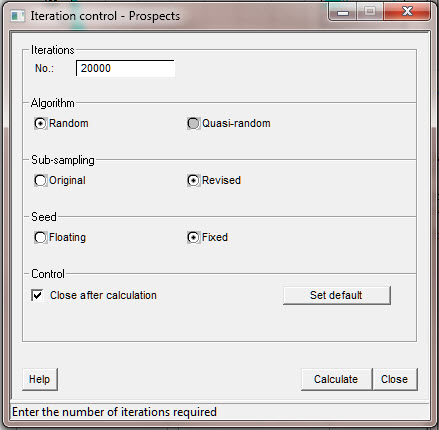
Iterations |
Enter the number of iterations required |
Algorithm |
Choose the type of algorithm required |
Sub sampling |
Calculate using Original (v5.3x) or Revised (v5.4x) binning |
Seed |
Choose the type of seed required |
Control |
Check to close dialog after calculation |
Set Default |
Click to set these parameters as default |


