Resource type |
  
|
Resource type |
|
In this dialog choose the appropriate resource type from the available options.
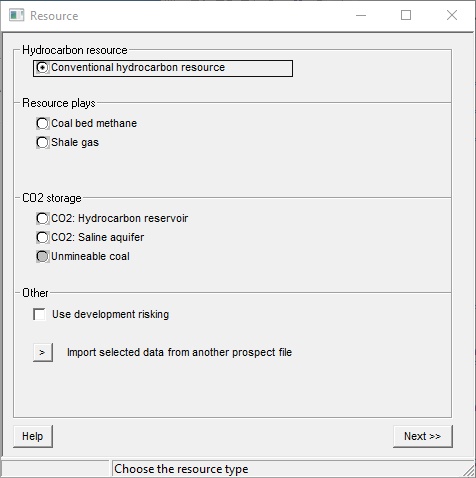
Depending on your program version, some options may not be available, and these are greyed out. See also resource plays.
Development risking is a way of entering chances of success for infill wells in producing assets. It is handled in exactly the same way as conventional exploration risking, but of course the questions are different. The choice of scheme in found in Set-up | Installation.
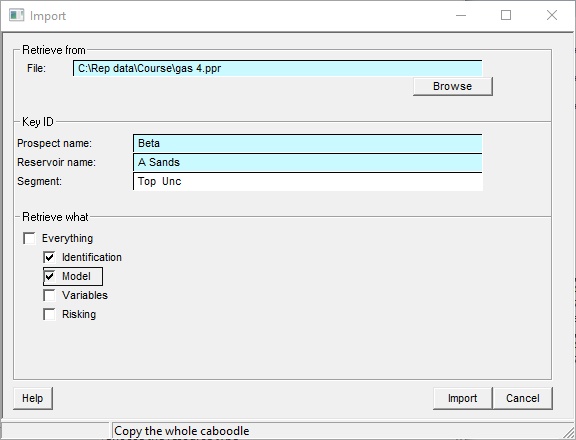
This is an easy way to start off a new prospect with selected data from an existing one.
Retrieve from |
|
File |
Browse for the file from which to retrieve data. A recent file list is shown if you click the dropdown at the inner right edge of the entry. |
|
|
Key ID |
These are copied from the input file, and you should change them to appropriate entries for the new prospect |
Prospect name |
|
Reservoir name |
|
Segment |
|
|
|
Retrieve what |
|
Everything |
The new data is a full copy of the input, including models, layers, variables, risking .. etc. |
Identification |
This is the data under the "ID" tab, including cut-offs |
Model |
The basic model (or models) in terms of GRV entry, hydrocarbon type etc. |
Variables |
Input variables |
Risking |
The geological risking |