Validate and archive |
  
|
Validate and archive |
|
Different companies have different procedures for peer-review and validation. This menu item will check a given prospect file for "integrity" and save a copy in some safe place.
In this context, integrity is really a check that everything has been filled in and commented. It is NOT a check on geological integrity, which REP wisely leaves to the peer review process.
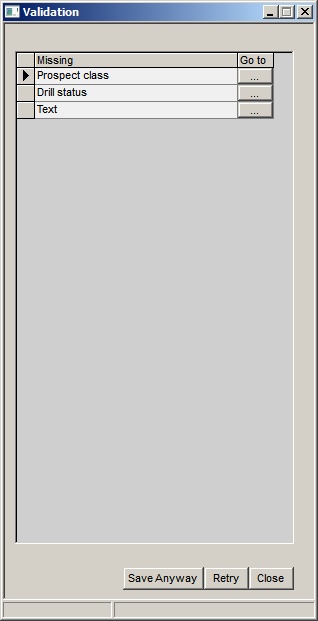
The first dialog shows what REP thinks still needs to be filled in. Exactly what this is can be customised, but at its most extreme is pretty much everything - all the descriptions, comment fields etc. etc.. It is very good discipline (possibly good management) to have everything properly documented. If, according to the current check list, everything is properly completed this dialog is skipped.
Validation |
|
Missing |
A brief description of what need to be filled in |
Go to |
Go to the dialog where you can fill it in. |
|
|
Buttons |
|
Save anyway |
Go to the save (next) dialog without further edits |
Retry |
Presumable having filled in stuff, try the check again. |
Close |
Cancel |
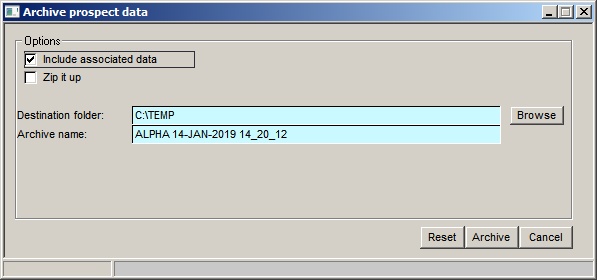
The next dialog concerns where and with what name the file is saved.
Validation |
|
Include associated files |
Also archive any associated files |
Zip it up |
Put all archived files into a zip file |
|
|
Destination folder |
Where to store them. The default is user-specified "Peer review archive path" - see user options, location of files. |
Archive name |
The name given to the prospect file - by default will be the file name + date and time. (If you change it, but want to reset it back, click the reset button. |