Import from XL |
  
|
Import from XL |
|
There are 2 ways of doing this
New prospect is appropriate when you have a spreadsheet with input data from an outside source. See Import from XL.
From XL multi-tabbed file is used when you've exported data from REP, and have made changes in the exported spreadsheet. The changes can then be re-imported. The assumption is that (a) the prospect already exists in REP and (b) the exported XL spreadsheet has the prospect (ppr) file name written somewhere, so that the link can be easily made.
Sometimes prospect input data are available on a 3rd-party spreadsheet (or perhaps one of your own). You can import this data directly into REP, using a data template, identical to that used for exporting REP data to a spreadsheet.
The data template is as ASCII, editable file which links REP data entries with spreadsheet cell locations. To get going, start a new prospect and choose "File | Import from XL | New prospect" from the menu.
To make the import you need to enter the XL spreadsheet name, and the template, in this dialog:
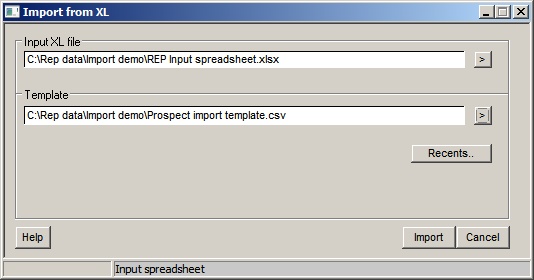
You might wish to make different templates for different prospect types - oil and gas, for example. (Please contact us if you need help with templates). Recently used templates are available from the "Recents.." button.
Click the Import button to make the import. Check the data using Input data summary  .
.
This function takes a spreadsheet that has been generated via the 'Export to XL>to XL prospect file>Direct - all loaded>separate tabs' function. The spreadsheet should contain individually named tabs corresponding to the prospect files that were loaded in that REP session. This function then reads the spreadsheet and regenerates the prospects, one for each tab, and loads them into memory.
First, select your source spreadsheet and you will see a message confirming the number of tabs to be imported. you will then be asked to select a target folder for the prospect files. The process then loops through the tabs, creating the prospects and, when completed, displays the resulting tabs in the current prospect tree.
The process assumes that the same template is used that was used to generate the exported XL file.
A common use for this function Is to allow a set of prospects to be exported, reviewed/edited in XL, then the amended values to be easily re-imported back into REP.