Prospect Risking - Scheme 7 (Using an XL Spreadsheet to Enter Chances of Success) |
  
|
Prospect Risking - Scheme 7 (Using an XL Spreadsheet to Enter Chances of Success) |
|
You can use an XL spreadsheet to enter the risking. The advantage of this is that you can continually update it without the necessity for program changes or even letting us know (as long as some simple rules are followed). It also remains in your offices and Logicom or other REP users need never see it.
To use such a system go to Setup | Installation from the main REP menu (first window) and choose risking Scheme 7 ("XL-based"'). Below, enter the file name of the master spreadsheet that defines your risking scheme. You also need to define the name of the worksheet within the spreadsheet which contains the final risks.
The spreadsheet can be anywhere on your network or your local machine. We recommend you mark the master spreadsheet "read only" so that users cannot change it.
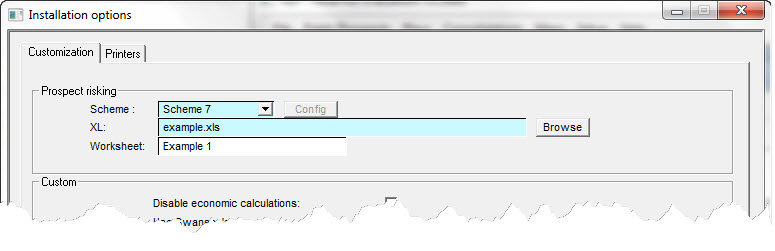
Note: It is not part of the REP installation so if you load REP onto a new machine you must remember to put the spreadsheet on it too.
When you start a new prospect and go to Prospect Risking, REP loads the spreadsheet into an XL window. Most of the normal XL functions are available (for reasons unknown to the global user community, print preview is not amongst them). Enter data in the spreadsheet as you would using XL in the normal way. When you are done, choose the XL menu item File | Save (or Save as). This does two things: it saves the XL file (by default, it will go in the same directory as the prospect .ppr file and we recommend you keep it so but it is not absolutely necessary) and it tells REP to retrieve the key data from the spreadsheet. These are the play chances and the prospect specific risks as defined in the spreadsheet.
Note: The act of saving the file updates REP. If you do not save the spreadsheet you will lose your work in XL.
The XL spreadsheet filename becomes part of the prospect .ppr file, so you should be sure to save the .ppr file after making any changes to the spreadsheet. Of course, you should do this anyway unless you want to lose all your REP entries.
The rules for making the spreadsheet work are simple. REP searches the specified worksheet for named cells corresponding to the categories of risk that it recognises. These names are:
Play Chances |
|
pl_res |
Chance of Regional Reservoir |
pl_source |
Chance of Regional Source |
pl_seal |
Chance of Regional Seal |
|
|
Prospect Specific Chances |
|
pr_trap |
Trap |
pr_res |
Reservoir |
pr_seal |
Seal |
pr_mig |
Migration |
pr_source |
Source |
If REP cannot find a cell with one of the above names it will set that chance to 100%.
If you have any problems making your spreadsheet work, please contact us at Logicom and we will sort out the problem. Or at least try to.